Posts mit dem Label 12c werden angezeigt. Alle Posts anzeigen

2015-11-21

anatomy of DBA_FEATURE_USAGE_STATISTICS

In Oracle database the vie DBA_FEATURE_USAGE_STATISTICS is given to
display information about database feature usage statistics.
That's all I can find in The (12.1) Docu.

Just in case anyone asks - DBA_FEATURE_USAGE_STATISTICS is not mentioned in the license guide at all:
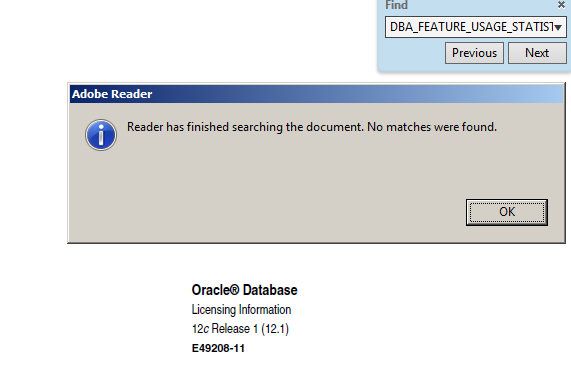
Still for me it's interesting what's behind the view, and how it's content is populated.

So I started to analyze it's anatomy.
Starting with the view definition (slightly rewritten for better readability):
SELECT samp.dbid,      
       fu.name,  
       samp.version,   
       fu.detected_usages, 
       samp.total_samples, 
       Decode(To_char( last_usage_date,  'MM/DD/YYYY, HH:MI:SS'), 
              NULL, 'FALSE', 
              To_char( last_sample_date, 'MM/DD/YYYY, HH:MI:SS'), 
              'TRUE', 'FALSE') currently_used, 
       fu.first_usage_date, 
       fu.last_usage_date, 
       fu.aux_count, 
       fu.feature_info, 
       samp.last_sample_date, 
       lsamp.ast_sample_period, 
       samp.sample_interval, 
       mt.description 
FROM   wri$_dbu_usage_sample samp, 
       wri$_dbu_feature_usage fu, 
       wri$_dbu_feature_metadata mt 
WHERE  samp.dbid = fu.dbid 
       AND samp.version = fu.version 
       AND fu.name = mt.name 
       AND fu.name NOT LIKE '_DBFUS_TEST%'    /* filter out test features */ 
       AND Bitand(mt.usg_det_method, 4) != 4  /* filter out disabled features */

This view is quite simple, and all important columns of wri$_dbu_usage_sample and wri$_dbu_feature_usage are shown in the projection.
The filters are only to hide some rows used for internal testing.

So the interesting part are those columns of wri$_dbu_feature_meatadata which are not shown.
In this table are 2 groups of columns:
The first group are the columns INST_CHK_METHOD and INST_CHK_LOGIC.
They describe if and how to check, if a detailed detection is needed at all.
INST_CHECK_METHOD has 3 possible values right now:
DBU_INST_ALWAYS_INSTALLED1/* no test required */
DBU_INST_OBJECT2 /* object name in LOGIC */
DBU_INST_TEST4/* only test */
DBU_INST_ALWAYS_INSTALLED means the test is run always. If DBU_INST_OBJECT it's only tested, if the object in INST_CHK_LOGIC exists.

The detection itself is described in the columns USG_DET_METHOD and USG_DET_LOGIC.
USG_DET_METHOD has 3 possible values:
DBU_DETECT_BY_SQL1/* SQL specified in USG_DET_LOGIC */
DBU_DETECT_BY_PROCEDURE2 /* Procedure specified in USG_DET_LOGIC */
DBU_DETECT_NULL4/* only test for _DBFUS_TEST_SQL_7 */

If it's set to DBU_DETECT_BY_SQL, the SQL stored in USG_DET_LOGIC is executed and it's result stored. In case it's DBU_DETECT_BY_PROCEDURE, the procedure is called. It has 3 parameters (with different names, but the type is always the same):
Argument Name Type   In/Out Default 
------------- ------ ------ ------- 
IS_USED       NUMBER OUT            
DATA_RATIO    NUMBER OUT            
CLOB_REST     CLOB   OUT    

DATA_RATIO will be stored in AUX_COUNT, CLOB_REST in FEATURE_INFO.

These infos should be sufficient to analyze everything inside and related to DBA_FEATURE_USAGE_STATISTICS.


During the research I found 2 ways to do a immediate run of all tests. Instead of the default weekly run. Those update wri$_dbu_feature_usage - so the results are stored.

The first one is to kick mmon to run the usage sampling out of schedule:
alter session set events 'immediate trace name mmon_test level 6';

The second method is to run the sampling in the current session. This is quite nice for any kind of tracing:
alter session set "_SWRF_TEST_ACTION"=53;


But be aware both methods can create a higher DETECTED_USAGES than weeks between FIRST_USAGE_DATE and LAST_USAGE_DATE.


For a proper mapping between entries in DBA_FEATURE_USAGE_STATISTICS and options/packs there is a script options_packs_usage_statistics.sql provided by My Oracle Support in Database Options/Management Packs Usage Reporting for Oracle Databases 11gR2 and 12c (Doc ID 1317265.1)

2015-10-10

12c datapatch - take care of parallel patching

datapatch is a nice new feature in recent Oracle database installations. It helps to ensure the databases objects match the binaries after any kind of patching and so avoid situations which can be an operational and support nightmare - and very hard to identify.

Problem


Unfortunately it has some drawbacks as well.
One of those I hit recently when running datapatch on 2 instances which uses the same ORACLE_HOME.
At some time in it's progress datapatch uses dbms_qopatch.get_opatch_lsinventory, which uses the external table SYS.OPATCH_XML_INV. This has the preprocessor $ORACLE_HOME/QOPatch/qopiprep.bat. This script executes
$ORACLE_HOME/OPatch/opatch lsinventory -xml  $ORACLE_HOME/QOpatch/xml_file.xml -retry 0 -invPtrLoc $ORACLE_HOME/oraInst.loc >> $ORACLE_HOME/QOpatch/stout.txt
`echo "UIJSVTBOEIZBEFFQBL" >> $ORACLE_HOME/QOpatch/xml_file.xml`
echo `cat $ORACLE_HOME/QOpatch/xml_file.xml`
rm $ORACLE_HOME/QOpatch/xml_file.xml
rm $ORACLE_HOME/QOpatch/stout.txt
Maybe you see already what will happen when 2 different instances execute this step at the same time:
2 different opatch lsinventory -xml instances are writing into the same file. A very efficient was to corrupt the xml file, as they write to the same file $ORACLEHOME/QPatch/xml_file.xml

in one db I got this error:
Determining current state...DBD::Oracle::st execute failed: ORA-20001: Latest xml inventory is not loaded into table
ORA-06512: at "SYS.DBMS_QOPATCH", line 1937
ORA-06512: at "SYS.DBMS_QOPATCH", line 1259 (DBD ERROR: error possibly near <*> indicator at char 143 in 'SELECT description, startup_mode
               FROM XMLTable('/InventoryInstance/patches/patch[patchID=21573304]'
                    PASSING <*>dbms_qopatch.get_opatch_lsinventory
                    COLUMNS description VARCHAR2(100) PATH 'patchDescription',
                            startup_mode VARCHAR2(7) PATH 'sqlPatchDatabaseStartupMode')') [for Statement "SELECT description, startup_mode
               FROM XMLTable('/InventoryInstance/patches/patch[patchID=21573304]'
                    PASSING dbms_qopatch.get_opatch_lsinventory
                    COLUMNS description VARCHAR2(100) PATH 'patchDescription',
                            startup_mode VARCHAR2(7) PATH 'sqlPatchDatabaseStartupMode')"] at /appl/oracle/product/rdbms_121024Jc/sqlpatch/sqlpatch.pm line 1368, <LOGFILE> line 73.

in the other
verify_queryable_inventory returned ORA-31011: XML parsing failed
ORA-19202: Error occurred in XML processing
LPX-00229: input source is empty
ORA-06512: at "SYS.XMLTYPE", line 272
ORA-06512: at line 1

Queryable inventory could not determine the current opatch status.
Execute 'select dbms_sqlpatch.verify_queryable_inventory from dual'

But there might be different errors possible as well - all based on the concurrency issue here.

Workaround

In our environment the it's quite simple to workaround such issues: We jave scripts which do all the steps during patching, so the "apply datapatch" module just needs a small extension which ckecks for a "latch" (existence of a file in our case) and only continues if it can grab this file. Otherwise it sleeps for a short time.

Solution

Oracle could easily use a filename like  $ORACLEHOME/QPatch/xml_file.$$.xml instead. I'm not sure if it's worth the effort to fight through the perimeters in MOS.

Update

(2015-12-28)
I found 12.1:Parallel Execution Of Datapatch during Patching or Manual upgrade fails with error " Queryable inventory could not determine the current opatch status " (Doc ID 2054286.1) today which describes exactly this behavior.
Patch:19215058 solves the issue by implementing
DBSID=$ORACLE_SID
...
$ORACLE_HOME/QOpatch/xml_file_$DBSID.xml
...