Posts mit dem Label cpu_count werden angezeigt. Alle Posts anzeigen

2022-11-20

dynamic paramater change when CPUs (dis)appear

 In my last 2 blogposts I covered how Oracle instance parameters change based on cpu_count at startup, and also what's the minimum requirement for SGA size

But there is more to discover! Modern systems can change the number of CPUs while running. This feature is quite popular in cloud environments but in fact was already available more than 20 years ago

To see if this has any impact on my (21c) sandbox instance, I used a small "trick" in Linux: 
As root I can set a CPU offline (or back online) by 

echo 0 > /sys/devices/system/cpu/cpu7/online

This CPU becomes invisible to the processes - it also "disappears" in /proc/cpuinfo


At every change, the alert.log shows an entry like (The sampling frequency was 70 sec on my system)

2022-11-20T14:09:12.762038+00:00
Detected change in CPU count to 7
* Load Monitor used for high load check
* New Low - High Load Threshold Range = [0 - 0]

In this case my test was quite small (only 1..8 PCUs) but at least in that range only a small set of parameters changed:

PARAMETER
cpu_count
cpu_min_count
job_queue_processes
parallel_max_servers
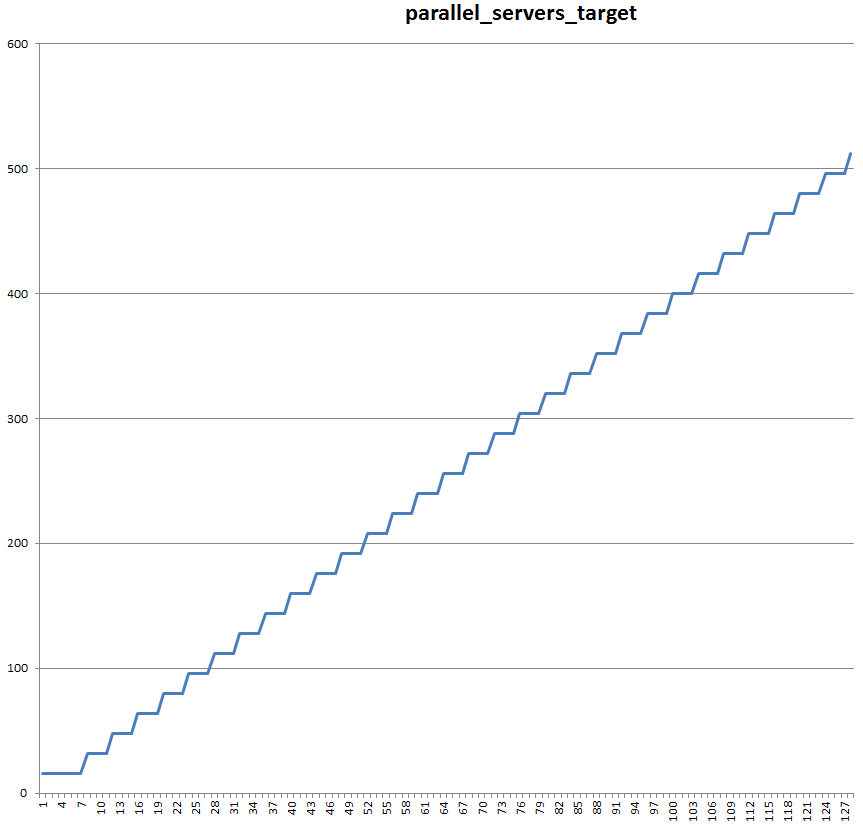
parallel_servers_target


cpu_count and cpu_min_count makes sense, the remaining parameters are only related to


parallel and job processes. All of them are following the simple formula cpu_count * 20

This follows the "normal" derived values for these parameters as shown before. 


Again this is nothing tremendous spectacular, but worth to know for performance engineering or analysis in volatile systems: Some parameters change and might lead to unexpected behavior, if the change isn't taken into consideration. 

2022-11-19

minimal SGA requirements - dependent on CPU_COUNT

In my previous post I described how different spfile parameters change dependent on the number of cpus available in the system (or the value of CPU_COUNT in my artificial testcase).
During these tests I saw this error (and so had to re-arrgange my scripts and try again): 

ORA-00821: Specified value of sga_target 16M is too small, needs to be at least 2032M

Even the instance started fine with a smaller cpu_count, it seems the SGA needs to grow when more CPUs are used. So it's worth to re-run the test and see, what's the minimum SGA per CPU. (Again, these tests are made on my sandbox with Version 21.8 - your values might differ). 
My measurement tells me SGA requirements between 260MB for 1 CPU and 11568MB for 255 CPUs (the raw data can be seen here). 
It looks there is a quite linear growth, and this is also confirmed: 

Call:
lm(formula = sga ~ cpu, data = data)

Residuals:
    Min      1Q  Median      3Q     Max 
-91.887 -55.661  -3.829  48.098 116.941 

Coefficients:
             Estimate Std. Error t value Pr(>|t|)    
(Intercept) 112.25259    7.38744    15.2   <2e-16 ***
cpu          44.50121    0.05003   889.5   <2e-16 ***
---
Signif. codes:  0 ‘***’ 0.001 ‘**’ 0.01 ‘*’ 0.05 ‘.’ 0.1 ‘ ’ 1

Residual standard error: 58.81 on 253 degrees of freedom
Multiple R-squared:  0.9997,    Adjusted R-squared:  0.9997 
F-statistic: 7.912e+05 on 1 and 253 DF,  p-value: < 2.2e-16

The core message is: SGA requirements starts with 112.3MB and adds about 44.5MB for each CPU. 

Even the graph looks quite straight, there is a little deviation from the numbers. To make them visible, I generated the delta and get this plot. 
It seems the residuals smile at me. We can also see the calculation up to 32 cpus is slightly different than the remaining, it drops to a minimum (negative residual) at 112 and then increases again. Beside this major pattern there are smaller groups also visible, this indicates different (internal) functions have their own increments and together, they provide this picture. 
Please be aware the units: in the first picture we have units of GB, de residuals are shown in MB. Over all they are still small. 
(In case you want to play with the data, my R commands are available)
You might think this is all irrelevant as with huge number of CPUS there also comes huge amount of memory which can be used for SGA. But at least for XE on nodes with many CPUs, there is a real impact (with a simple solution). 

2022-11-15

spfile parameters derived from cpu_count 11.1 up to 21

In Oracle databases some spfile parameters are derived based on others, if they are not set explicit.
One of the main drivers I discovered is CPU_COUNT.
So I did some tests based in the past for version, now up to 21.

the script I used this time is basically (of course with proper version name).
In comparison to previous versions sga_target is bigger again, now it's 12g (otherwise instances with higher ocunts wouldn't even start)
#!/usr/bin/ksh  -x

integer i=1
while ((i <= 255));
do
  print " $i ";

  echo "*.audit_file_dest='/_some_dir_/BX1/adump'
*.audit_trail='db'
*.compatible='21.0.0.0.0'
*.control_files='/u02/oradata/CDB1/control01.ctl','/u02/oradata/CDB1/control02.ctl'
*.db_block_size=8192
*.db_create_file_dest='/u02/oradata'
*.db_name='cdb1'
*.db_unique_name='cdb1'
*.diagnostic_dest='/u01/appl/oracle'
*.remote_login_passwordfile='EXCLUSIVE'
*.sga_target=12g
*.enable_pluggable_database=true
*.undo_tablespace='UNDOTBS1'
*._disable_cpu_check='TRUE'
*.cpu_count=$i" > /_some_dir_/cpus/initBX1_$i.ora

  echo "shutdown abort;
startup pfile='/_some_dir_/cpus/initBX1_$i.ora' ;

insert into init_parameters
select '21.08'     ,
       $i         ,
       a.ksppinm  ,
       b.ksppstvl ,
       c.ksppstvl
from x\$ksppi a, x\$ksppcv b, x\$ksppsv c
where a.indx = b.indx and a.indx = c.indx;

commit;

select distinct(\"CPUs\") from init_parameters;

shutdown;
exit;"> cpus/21doit$i.sql

sqlplus "/ as sysdba" @cpus/21doit$i.sql >cpus/21log$i.log

sleep 5

  (( i = i + 1));
done


To get a good picture of the changes, feel free to select parameters, versions or whatever you want below.
Raw data is available at GistHub.
The js app is available here.
(It's based on an idea PerfSheet.js by Luca Canali.

As some of the values are not numbers, I applied this mapping:
TRUE1
FALSE0
OFF0
ADAPTIVE -1
INSTANCE -2


2018-03-31

spfile parameters derived from cpu_count

In Oracle databases some spfile parameters are derived based on others, if they are not set explicit.
One of the main drivers I discovered is CPU_COUNT.
So I did some tests based in the past for version 11.1.0.7 and 12.1.0.2.
To simulate a machine with sufficient CPUs, I had to use a trick described in a previous post. Using _disable_cpu_check threw an ORA-7445:[ksucre] in 12.2 with cpu_count >126.

the script I used this time is basically (of course with 180 instead of 122 for 18.0).
#!/usr/bin/ksh  -x

integer i=1
while ((i <= 255));
do
  print " $i ";

  echo "*.audit_file_dest='/_some_dir_/BX1/adump'
*.audit_trail='db'
*.compatible='12.2.0.1.0'
*.control_files='/_some_dir_/BX1/controlfile/o1_mf_djd017z2_.ctl', '/_some_dir_/fast_recovery_area/BX1/BX1/controlfile/o1_mf_djd01834_.ctl'
*.db_block_size=8192
*.db_create_file_dest='/_some_dir_/oradata'
*.db_name='BX1'
*.db_recovery_file_dest='/_some_dir_/fast_recovery_area/BX1'
*.db_recovery_file_dest_size=7G
*.db_unique_name='BX1'
*.diagnostic_dest='/appl/oracle'
*.remote_login_passwordfile='EXCLUSIVE'
*.sga_target=7g
*.undo_tablespace='UNDOTBS1'
*.max_string_size='EXTENDED'
#*._disable_cpu_check='TRUE'
*.cpu_count=$i" > /_some_dir_/cpus/initBX1_$i.ora

  echo "shutdown abort;
startup pfile='/_some_dir_/cpus/initBX1_$i.ora' ;

insert into init_parameters
select '12.2'     ,
       $i         ,
       a.ksppinm  ,
       b.ksppstvl ,
       c.ksppstvl
from x\$ksppi a, x\$ksppcv b, x\$ksppsv c
where a.indx = b.indx and a.indx = c.indx;

commit;

select distinct(\"CPUs\") from init_parameters;

shutdown;
exit;"> cpus/122doit$i.sql

sqlplus "/ as sysdba" @cpus/122doit$i.sql >cpus/122log$i.log

sleep 5

  (( i = i + 1));
done


11.1.0.712.1.0.212.2.0.118.0.0.0
_cursor_db_buffers_pinnedxxxx
_db_block_buffers xxxx
_db_block_lru_latches xxxx
__db_cache_sizexxxx
_db_file_exec_read_count xx
db_file_multiblock_read_countxx
_db_handlesxxx
db_writer_processesxxxx
dml_locksxxx
_enqueue_hashxxx
_enqueue_hash_chain_latchesxxxx
_enqueue_locksxxxx
_enqueue_resourcesxxx
_flashback_generation_buffer_sizexxxx
_gc_fast_index_split_waitx
_gcs_min_cr_slavesxx
_kghdsidx_countxx

_hang_resolution_scopexx
_ksmsq_hintmaxprocx
__large_pool_sizexxx
_lms_rollbacksxx
log_bufferxxxx
_log_parallelism_maxxxxx
_log_simultaneous_copiesxxxx
_max_log_write_parallelismxx
_max_outstanding_log_writesxxx
_max_pending_scn_bcastsxxx
_messagesxxx
_num_longop_child_latchesxxxx
_num_rlslavesxx
parallel_max_serversxxxx
_parallel_min_message_poolxxxx
parallel_min_serversxxx
parallel_servers_targetxxx
pga_aggregate_limitxxx
_pmon_max_slavesxx
_pmon_slaves_arr_sizexx
processesxxx
_px_proactive_slave_alloc_thresholdxxx
_session_allocation_latchesxxx
sessionsxxx
sga_max_sizexx
shared_pool_reserved_sizexxx
__shared_pool_sizexxxx
_shared_server_num_queuesxxxx
_small_table_thresholdxxxx
_spin_count xxxx
_sqlmon_max_plan
xxx
_super_shared_conversion_threshold
xx
transactions xxx
_use_single_log_writer xxx

To get a good picture of the changes, feel free to select parameters, versions or whatever you want below.
Raw data is available at GistHub.
The js app is available here.
(It's based on an idea PerfSheet.js by Luca Canali.

As some of the values are not numbers, I applied this mapping:
TRUE1
FALSE0
OFF0
ADAPTIVE -1
INSTANCE -2


2018-03-20

real virtual CPUs

Some software changes it's behavior based on capabilities of the system it's running on.
but sometimes it's interesting to check how a software would heave on a different system, which is not at hand right now.

On Linux, a lot of information about the current system can be found in /proc and /sys.
These filesystems are virtual, so they can not changed easily with an editor.

In my case I want to simulate  a lot more CPUs.
These are visible in several locations.
The most know is probably /proc/cpuinfo.  There you find a block of information for each CPU the kernel knows about. Based on the current configuration, I create a modified fake file somewhere in a different space:
#!/bin/bash
# cpus.sh

count=0
max_socket=8
max_core=32

END=5
for ((soc=0;soc<max_socket;soc++)); do
    for (( cor=0;cor<max_core;cor++)); do
echo "processor       : $count
vendor_id       : GenuineIntel
cpu family      : 6
model           : 37
model name      : Intel(R) Xeon(R) CPU E5-2660 v3 @ 2.60GHz
stepping        : 1
microcode       : 0x3b
cpu MHz         : 2596.103
cache size      : 25600 KB
physical id     : $soc
siblings        : $max_core
core id         : $cor
cpu cores       : $max_core
apicid          : 0
initial apicid  : 0
fpu             : yes
fpu_exception   : yes
cpuid level     : 11
wp              : yes
flags           : fpu vme de pse tsc msr pae mce cx8 apic sep mtrr pge mca cmov pat pse36 clflush dts mmx fxsr sse sse2 ss syscall nx rdtscp lm constant_tsc arch_perfmon pebs bts nopl xtopology tsc_reliable nonstop_tsc aperfmperf pni pclmulqdq ssse3 cx16 sse4_1 sse4_2 x2apic popcnt tsc_deadline_timer aes hypervisor lahf_lm ida arat epb pln pts dtherm pti tsc_adjust
bugs            : cpu_meltdown spectre_v2
bogomips        : 5193.98
clflush size    : 64
cache_alignment : 64
address sizes   : 42 bits physical, 48 bits virtual
power management:

"
    let count=count+1
    done
done
and create a file with ./cpus.sh>cpuinfo.256

There is another location as well: /sys/devices/system/cpu.
In this directory are several directories and files with interesting information.

I copy the fill directory to another place (ignoring all the errors).
First the number of cpu[id] directories might need adjustment.
In my case a simple set of symlinks is sufficient:
for i in {2..255} ; do
  echo $i
  ln -s cpu1 cpu${i}
done  
In every cpu[id] durectory there is a symlinik to which node it belongs: node0 -> ../../node/node0
So it might be required to spoof proper entries in /sys/devices/system/node. In my case it's not required.

The last fix required in my case is in the file cpu/online.
It contains 0-255 now (instead of 0-2).

As I mentioned above the original files can not be manipulated as they are not real files.
The mount option --bind does the trick:
mount --bind <my_working_dir>/cpuinfo.256 /proc/cpuinfo
mount --bind <my_working_dir>/cpu /sys/devices/system/cpu

After these nice manipulations, my sandbox Oracle instance shows now plenty of CPUs:
SQL> show parameter cpu_count                                                                                                                                                      

NAME                                 TYPE        VALUE
------------------------------------ ----------- ------------------------------
cpu_count                            integer     256

Update (2018-03-21):
For Oracle Databases I got 2 hints how to make it calculate with more CPUs than really available.

with this small stap script:
#!/usr/bin/stap
function modify_rax() %{ long ret; ret = 6; memcpy( ((char *)CONTEXT->uregs) + 80 , &ret, sizeof(ret)); %}
probe process(“oracle”).function(“skgpnumcpu”).return { modify_rax(); }

and


2016-01-15

Instance parameters derived from cpu_count - 12.1.0.2

About 6 years ago I wanted to know which instance parameters are derived from cpu_count. So it tested a 11.1.0.7 DB - in that version there 21 parameters changed based on the value of cpu_count.
Some DB versions passed by so I decided it's time for another check. This time it's 12.1.0.2 without any PSUs/patches. The machine is the same class as previous, so it took some time.

the script is nearly the same today:
!/usr/bin/ksh  -x

integer i=1
while ((i <= 128));
do
  print " $i ";

  echo "*.audit_file_dest='/appl/oracle/admin/BERX3_GLOBAL/adump'
*.audit_trail='db'
*.compatible='12.1.0.2.0'
*.control_files='/appl/oracle/oradata/BERX3_GLOBAL/controlfile/o1_mf_c9h3bxlw_.ctl','/appl/oracle/fast_recovery_area/BERX3_GLOBAL/controlfile/o1_mf_c9h3bxpg_.ctl'
*.db_block_size=8192
*.db_create_file_dest='/appl/oracle/oradata'
*.db_name='BERX3_GL'
*.db_recovery_file_dest='/appl/oracle/fast_recovery_area'
*.db_recovery_file_dest_size=4815m
*.db_unique_name='BERX3_GLOBAL'
*.diagnostic_dest='/appl/oracle'
*.remote_login_passwordfile='EXCLUSIVE'
*.sga_target=13g
*.undo_tablespace='UNDOTBS1'
*.cpu_count=$i" > /appl/home/oracle/instance_parameters/cpus/initBERX2_$i.ora

  echo "startup pfile='/appl/home/oracle/instance_parameters/cpus/initBERX2_$i.ora' ;

insert into init_parameters
select $i         ,
       a.ksppinm  ,
       b.ksppstvl ,
       c.ksppstvl
from x\$ksppi a, x\$ksppcv b, x\$ksppsv c
where a.indx = b.indx and a.indx = c.indx;

commit;

select distinct(\"CPUs\") from init_parameters;

shutdown;

exit;"> cpus/doit$i.sql

sqlplus "/ as sysdba" @cpus/doit$i.sql >cpus/log$i.log

sleep 5

  (( i = i + 1));
done

And all the values interesting is available again.
There are 40 parameters now changing value based on cpu_count - so a lot more of things which will change, when you "only" add/remove CPUs or alter instance caging.

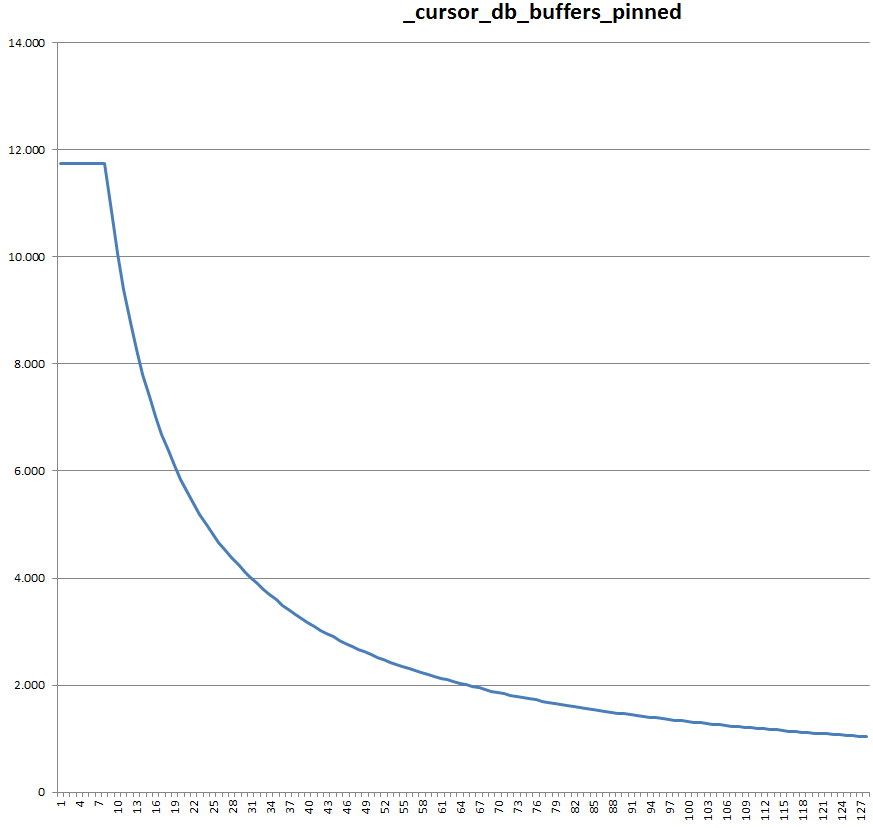
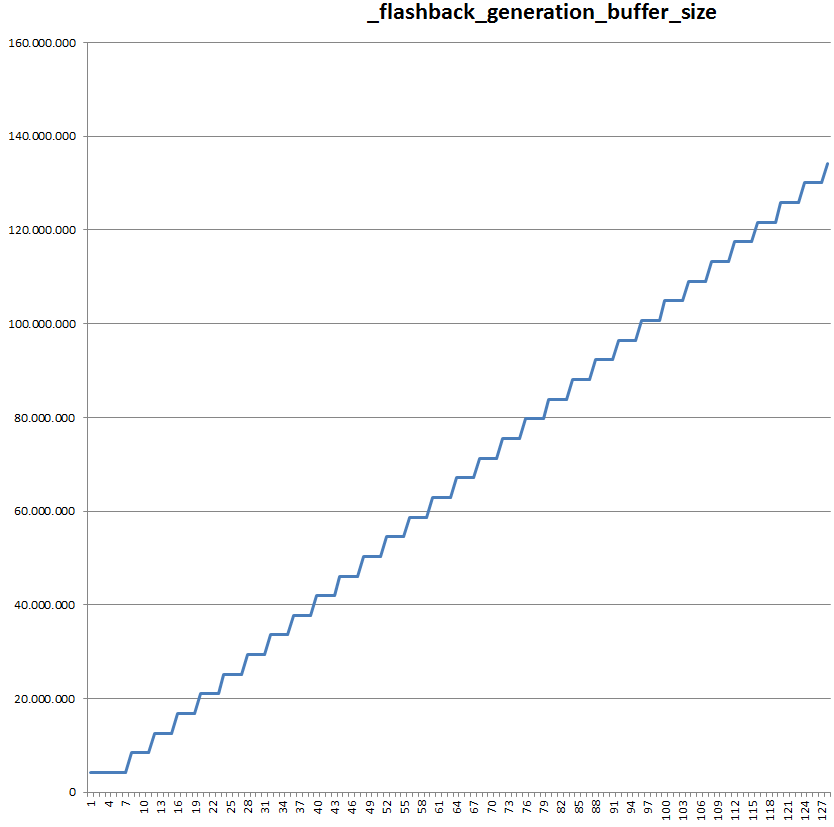
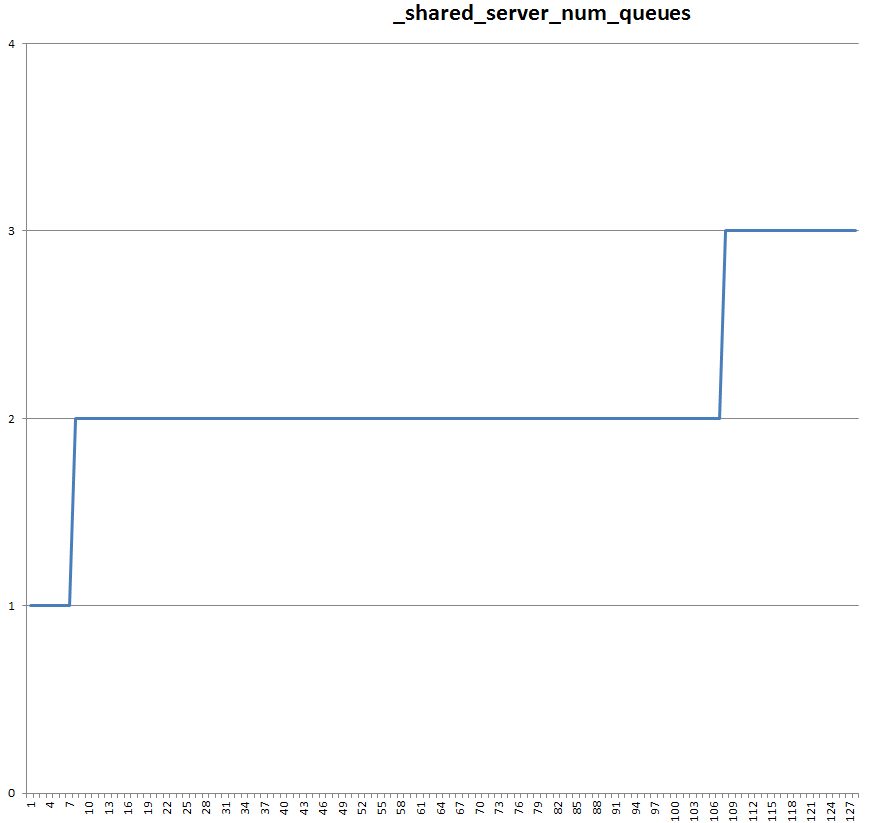
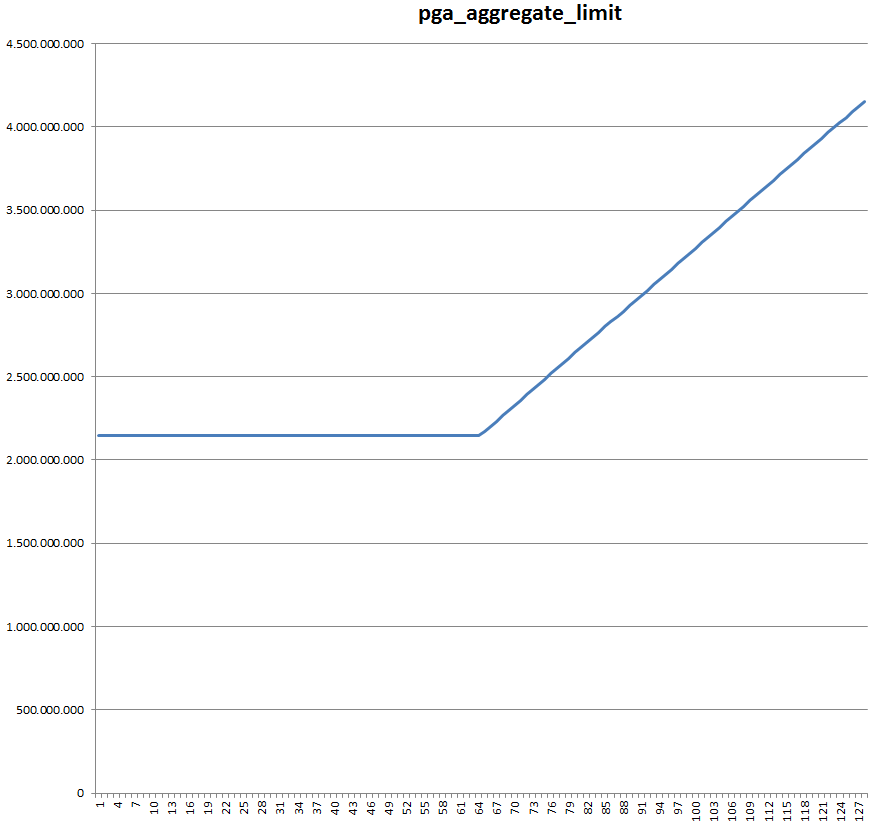
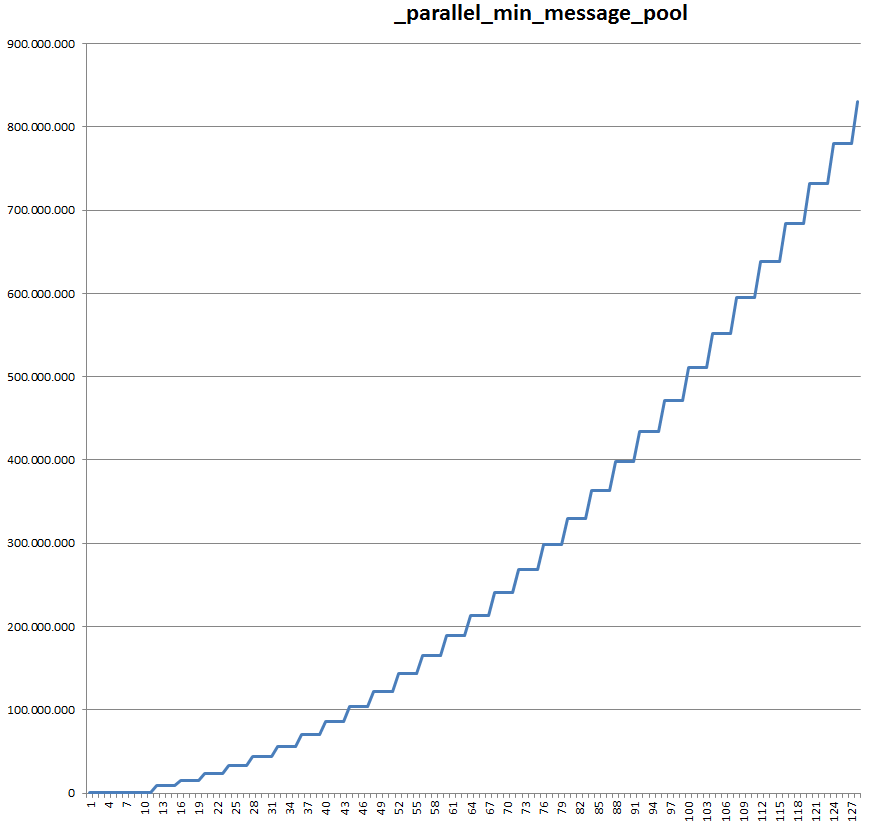
Here are the graphs for 12.1.0.2 - and 11.1.0.7 if they exist already. Some look quite different.

__db_cache_size


11.1.0.7:


__java_pool_size


__large_pool_size


__shared_pool_size


11.1.0.7:


_cursor_db_buffers_pinned


11.1.0.7:


_db_block_buffers


11.1.0.7:


_db_block_lru_latches


11.1.0.7:


_db_handles


_enqueue_hash


_enqueue_hash_chain_latches


11.1.0.7:


_enqueue_locks


11.1.0.7:


_enqueue_resources


_flashback_generation_buffer_size


11.1.0.7:


_kghdsidx_count


11.1.0.7:


_log_parallelism_max


11.1.0.7:


_log_simultaneous_copies


11.1.0.7:


_max_outstanding_log_writes


_max_pending_scn_bcasts


_messages


_num_longop_child_latches


11.1.0.7:


_parallel_min_message_pool


11.1.0.7:


_px_proactive_slave_alloc_threshold


_session_allocation_latches


_shared_server_num_queues


11.1.0.7:


_small_table_threshold


11.1.0.7:


_spin_count


11.1.0.7:


_sqlmon_max_plan


11.1.0.7:


_use_single_log_writer

is TRUE for cpu_count 1..7 and ADAPTIVE for 8..128


db_writer_processes


11.1.0.7:


dml_locks


log_buffer


11.1.0.7:


parallel_max_servers


11.1.0.7:


parallel_min_servers


parallel_servers_target


pga_aggregate_limit


processes


sessions


shared_pool_reserved_size


transactions