Posts mit dem Label SQLDeveloper werden angezeigt. Alle Posts anzeigen

2019-09-30

Simple getTracefile

Tracefiles are a very valuable source of information in Oracle databases.
In Versions prior to 12.2 quite complicated objects (with java dependency) were required.
Fortunately, in 12.2 Oracle introduced (& documented) the View V$DIAG_TRACE_FILE_CONTENTS. Unfortunately for some (only good from an internal technical perspective) reasons it does not contain the file itself, or a LOB locator, but several chunks as VARCHAR2. So it's still worth to write some code for a simple interface to access the tracefiles.

Again it's a SQLDeveloper report. But the structure is so simple, it can be implemented in any preferred tool.


There is a simple list of tracefiles and their MODIFY_TIME as FILEDATE - based on V$DIAG_TRACE_FILE.


When a specific tracefile name is selected, the file is presented as text and BLOB. The content is identical, just BLOBs can be downloaded which is useful for huge tracefiles, whereas the CLOB representation is simple to directly read small tracefiles.


Fortunately no objects are required in the database, only proper grants on V$DIAG_TRACE_FILE and V$DIAG_TRACE_FILE_CONTENTS. These can be roles also.

As I have limited access to databases right now, I could not test a lot of settings, e.g. RAC or different character sets.

Just import this Report as an User Defined Report:

<?xml version="1.0" encoding="UTF-8" ?>
<displays>
<display id="04e5e018-014a-1000-8001-ac193119805c" type="" style="Table" enable="true">
<name><![CDATA[get tracefiles]]></name>
<description><![CDATA[create a list of tracefiles as listed in V$DIAG_TRACE_FILE and makes specific files available]]></description>
<tooltip><![CDATA[create a list of tracefiles in DIAG directory and makes specific files available ]]></tooltip>
<drillclass><![CDATA[null]]></drillclass>
<CustomValues>
<TYPE>horizontal</TYPE>
</CustomValues>
<query>
<sql><![CDATA[select TRACE_FILENAME as TRACE_NAME ,
 MODIFY_TIME as FILEDATE
from V$DIAG_TRACE_FILE
Order By MODIFY_TIME desc]]></sql>
</query>
<pdf version="VERSION_1_7" compression="CONTENT">
<docproperty title="-" author="berx" subject="-" keywords="-" />
<cell toppadding="2" bottompadding="2" leftpadding="2" rightpadding="2" horizontalalign="LEFT" verticalalign="TOP" wrap="true" />
<column>
<heading font="null" size="10" style="NORMAL" color="-16777216" rowshading="-1" labeling="FIRST_PAGE" />
<footing font="null" size="10" style="NORMAL" color="-16777216" rowshading="-1" labeling="NONE" />
<blob blob="EMBED" zip="false" />
</column>
<table font="Agency FB" size="10" style="NORMAL" color="-16777216" userowshading="false" oddrowshading="-1" evenrowshading="-1" showborders="true" spacingbefore="12" spacingafter="12" horizontalalign="LEFT" />
<header enable="false" generatedate="false">
<data>
 
null                                                               </data>
</header>
<footer enable="false" generatedate="false">
<data value="null" />
</footer>
<security enable="false" useopenpassword="false" openpassword="null" encryption="EXCLUDE_METADATA">
<permission enable="false" permissionpassword="null" allowcopying="true" allowprinting="true" allowupdating="false" allowaccessdevices="true" />
</security>
<pagesetup papersize="LETTER" orientation="1" measurement="in" margintop="1.0" marginbottom="1.0" marginleft="1.0" marginright="1.0" />
</pdf>
<display id="null" type="" style="Table" enable="true">
<name><![CDATA[get tracefile]]></name>
<description><![CDATA[access the specific tracefile ]]></description>
<tooltip><![CDATA[Specific tracefile from list above ]]></tooltip>
<drillclass><![CDATA[null]]></drillclass>
<CustomValues>
<TYPE>horizontal</TYPE>
</CustomValues>
<query>
<sql><![CDATA[with function get_tracefile (filename varchar2) return CLOB IS
-- PRAGMA AUTONOMOUS_TRANSACTION;
-- to avoid ORA-14553: cannot perform a lob write operation inside a query 
-- only required in dedicated function
--
-- in a dedicated function, this grant is required:
-- grant select on sys.V_$DIAG_TRACE_FILE_CONTENTS to xxx;
  l_out CLOB := EMPTY_CLOB;
  CURSOR all_payload (fn varchar2)
  is 
  Select Payload
  from V$DIAG_TRACE_FILE_CONTENTS 
  where trace_filename=fn
    and payload is not null
  order by line_number asc;
begin
  NULL;
   
   DBMS_LOB.CREATETEMPORARY(l_out, FALSE, DBMS_LOB.CALL);

  for r_payload in all_payload(filename)
  loop
    DBMS_lob.append(l_out, r_payload.payload);
  end loop;
  return l_out;
  DBMS_LOB.FREETEMPORARY(l_out);
end get_tracefile;
function get_tracefile_blob (filename varchar2) return BLOB IS
-- PRAGMA AUTONOMOUS_TRANSACTION;
-- to avoid ORA-14553: cannot perform a lob write operation inside a query 
-- only required in dedicated function
--
-- in a dedicated function, this grant is required:
-- grant select on sys.V_$DIAG_TRACE_FILE_CONTENTS to xxx;
  l_out BLOB := EMPTY_BLOB;
  CURSOR all_payload (fn varchar2)
  is 
  Select Payload
  from V$DIAG_TRACE_FILE_CONTENTS 
  where trace_filename=fn
    and payload is not null
  order by line_number asc;
begin
  NULL;
   DBMS_LOB.CREATETEMPORARY(l_out, FALSE, DBMS_LOB.CALL);
  for r_payload in all_payload(filename)
  loop
    DBMS_lob.append(l_out, utl_raw.cast_to_raw(r_payload.payload));
  end loop;
  return l_out;
  DBMS_LOB.FREETEMPORARY(l_out);
end get_tracefile_blob ;
select get_tracefile(:TRACE_NAME) as " Tracefile", get_tracefile_blob(:TRACE_NAME) as " Binary Tracefile " from dual]]></sql>
<binds>
<bind id="TRACE_NAME">
<prompt><![CDATA[TRACE_NAME]]></prompt>
<tooltip><![CDATA[TRACE_NAME]]></tooltip>
<value><![CDATA[NULL_VALUE]]></value>
<bracket><![CDATA[null]]></bracket>
</bind>
</binds>
</query>
<pdf version="VERSION_1_7" compression="CONTENT">
<docproperty title="-" author="-" subject="-" keywords="-" />
<cell toppadding="2" bottompadding="2" leftpadding="2" rightpadding="2" horizontalalign="LEFT" verticalalign="TOP" wrap="true" />
<column>
<heading font="null" size="10" style="NORMAL" color="-16777216" rowshading="-1" labeling="FIRST_PAGE" />
<footing font="null" size="10" style="NORMAL" color="-16777216" rowshading="-1" labeling="NONE" />
<blob blob="EMBED" zip="false" />
</column>
<table font="null" size="10" style="NORMAL" color="-16777216" userowshading="false" oddrowshading="-1" evenrowshading="-1" showborders="true" spacingbefore="12" spacingafter="12" horizontalalign="LEFT" />
<header enable="false" generatedate="false">
<data>
 
null          </data>
</header>
<footer enable="false" generatedate="false">
<data value="null" />
</footer>
<security enable="false" useopenpassword="false" openpassword="null" encryption="EXCLUDE_METADATA">
<permission enable="false" permissionpassword="null" allowcopying="true" allowprinting="true" allowupdating="false" allowaccessdevices="false" />
</security>
<pagesetup papersize="LETTER" orientation="1" measurement="in" margintop="1.0" marginbottom="1.0" marginleft="1.0" marginright="1.0" />
</pdf>
</display>
</display>
</displays>

Any comments, hints or recommendations are highly welcome!

2018-10-11

SQL Real Time Monitoring pure HTML report (thanks to SQLDeveloper 18.3)

Yesterday (from the writing of this post perspective) SQLDeveloper 18.3 came out.
(it seems SQL Developer does not strict follow Oracle Database Release Number schema, otherwise it must be 18.4 already as it's released in 4th quarter of 2018)

There are many bugs fixed on 18.3 and some nice enhancements there as well.

My favorite enhancement is Real Time SQL Monitoring, HTML exports now available - no flash!

As Tanel Poder wrote about it already (Generate Oracle SQL Monitoring Reports as HTML using SQL Developer v18.3 (no Flash needed)) I'll show how you can use it without SQL Developer.
I'm not against SQL Developer, in fact I'm very happy with it!
Just the Real Time SQL Monitor tab seems kind of unresponsive to me, especially on DBs with many active sessions and high load.


So if I don't want to watch a java process drawing circles and showing blur previews, I first go to query v$sql_monitor. Beside all the columns I'll need to identify my SQL of interest, I need the columns SQL_ID, SQL_EXEC_ID, and SQL_EXEC_START.
And, of course at least once you must create a new HTML Report with SQL Developer! Save this report as a template for later use.

When you open the HTML report in an editor, there are 2 lines of special interest:
 var data_sqlId = '3v64dcg0rja6k'; 
 var data_xml = '<report db_version="12.1.0.2.0...>"

You can replace them easily with the context of your SQL of interest.
To get the proper XML you can use DBMS_SQLTUNE.report_sql_monitor. But as this function provides a multiline XML, but the HTML expects the XML in one line, the call should be
SELECT XMLSerialize( DOCUMENT xmltype(DBMS_SQLTUNE.report_sql_monitor(
  sql_id         => '3v64dcg0rja6k',
  type           => 'XML',
  SQL_EXEC_ID    => 33554648, 
  SQL_EXEC_START => to_date('2018-10-10 05:36:17'),
  report_level   => 'ALL')) NO INDENT ) AS XML_report
FROM dual;
If you omit SQL_EXEC_ID or SQL_EXEC_START, the report will still compile but you should understand the difference in data you get displayed.

So the minimal count you create a new HTML-Only SQL Real Time Monitoring report with SQL Developer should be once. But if you read this ( and your DBs are properly licensed), spread the good news with all the people who might benefit from these reports!


Please keep in mind that the HTML file is loading CSS and JS files from and URL at Oracles Content Delivery platform - so they are subject to any change without a new release of SQL Developer, RDBMS or anything. So expect unexpected changes every time!

2018-10-01

seing your DB as it was some minutes ago

Last week during a discussion with a colleague we thought if it would make sense to have in SQLDeveloper the possibility to see the system "as it was some minutes ago".
Small errors can happen and also resource control isn't always perfect in every company.

Björn Rost suggested to use DBMS_FLASHBACK.ENABLE_AT_TIME:

A very clever suggestion!

Let's first look at the documentation:


DBMS_FLASHBACK


Using DBMS_FLASHBACK, you can flash back to a version of the database at a specified time or a specified system change number (SCN).

and in more detail:

DBMS_FLASHBACK Overview

DBMS_FLASHBACK provides an interface for the user to view the database at a particular time in the past, with the additional capacity provided by transaction back out features that allow for selective removal of the effects of individual transactions. This is different from a flashback database which moves the database back in time.
When DBMS_FLASHBACK is enabled, the user session uses the Flashback version of the database, and applications can execute against the Flashback version of the database.
DBMS_FLASHBACK is relevant only for the session in which it's called, so it doesn't change the database.
But it's unclear what's meant by database in this context.

Here a small testcase which shows some unexpected results of DBMS_FLASHBACK:
(I slightly edite the text for better readability)

drop table x1;
create table x1 (u number);

insert into x1 (u) values (1);

CREATE OR REPLACE FUNCTION "RETURN_SOMETHING" (
    i NUMBER
) RETURN VARCHAR2 AS 
-- Version 1
BEGIN
    IF ( i = 1 ) THEN
        RETURN 'red';
    ELSE
        RETURN 'blue';
    END IF;
END return_something;
/


select to_char(sysdate, 'YYYY-MM-DD HH24:MI:SS') now, u, return_something(u) rrr,
     dbms_flashback.get_system_change_number SCN
from x1;

NOW                          U RRR          SCN
------------------- ---------- ----- ----------
2018-10-01 19:37:56          1 red     24042787


exec sys.DBMS_SESSION.sleep(60);
There should be nothing fancy up to this time.
The table and function are created and the select works fine.
I need the DBMS_SESSION.sleep to copy/paste the proper timestamp into the next block of code:

update x1 set u = 2 where u = 1;

1 row updated.

CREATE OR REPLACE FUNCTION "RETURN_SOMETHING" (
    i NUMBER
) RETURN VARCHAR2 AS 
-- Version 2
BEGIN
    IF ( i = 1 ) THEN
        RETURN 'oans';
    ELSE
        RETURN 'zwoa';
    END IF;
END return_something;
/

select to_char(sysdate, 'YYYY-MM-DD HH24:MI:SS') now, u, return_something(u) rrr
from x1;

NOW                          U RRR  
------------------- ---------- -----
2018-10-01 19:39:32          2 zwoa 


Still nothing spectacular here - just the preparation done.
Now onto the interesting part:

EXEC dbms_flashback.enable_at_time(to_timestamp('2018-10-01 19:38:00','YYYY-MM-DD HH24:MI:SS'));


select to_char(sysdate, 'YYYY-MM-DD HH24:MI:SS') now, u, return_something(u) rrr
from x1;

NOW                          U RRR  
------------------- ---------- -----
2018-10-01 19:39:33          1 oans 


col text for A50
select text
from dba_source
where owner='BERX'
and name='RETURN_SOMETHING'
order by LINE asc;

TEXT                                              
--------------------------------------------------
FUNCTION        "RETURN_SOMETHING" (
    i NUMBER
) RETURN VARCHAR2 AS 
-- Version 1
BEGIN
    IF ( i = 1 ) THEN
        RETURN 'red';
    ELSE
        RETURN 'blue';
    END IF;
END return_something;

11 rows selected. 


Here we can see how DBMS_FLASHBACK.ENABLE_AT_TIME is set to a time between the 1st insert & create function and the 2nd block.
With this setting, the content of table X1 is as expected. Also DBA_SOURCE shows the code of RETURN_SOMETHING.
But the function itself is not changed in memory and works as of it's state NOW, not at the given flashback time.
The flashback time version of RETURN_SOMETHING is even visible when you open it in SQLDeveloper (you have to believe me or test it).
Don't forget to clean up after the tests:

exec dbms_flashback.disable;

select to_char(sysdate, 'YYYY-MM-DD HH24:MI:SS') now, u, return_something(u) rrr
from x1;

NOW                          U RRR  
------------------- ---------- -----
2018-10-01 19:39:33          2 zwoa 


For this testcase no COMMIT was used. ;-)

2015-05-11

Poor mans getTracefile

As you might know already, I'm a big fan of Oracle Traces. Consequently I'm a fan of Method-R tools to work with these files as well.
A very important part in the chain of tools is Method R Trace - an extension to SQL Developer - as it speeds up developers a lot: When they generate a tracefile, they can access it immediately and do not need to ask and wait for a DBA to get and provide the file. On the other side, I as a lazy dba want developers to serve themselves.
Therein Method R Trace specializes.
Beside the functionality to trace a current statement/script, in Version 2.0.0.43 of Method R Trace There was another functionality (called feature 2) to list all tracefiles

 and download them.

Unfortunately this functionality disappeared in Version 3.0.0.1 as I mentioned earlier.


As I really like that feature I implemented a poor mans getTracefile functionality in SQL Developer 4.1 with a mixture of Method R Trace Installation Script from version 2.0.0.43 and 3.0.0.1(+patch).


The outcome is not so nice looking or integrated, but it provides the general functionality.
You can list all the tracefiles in a User Defined Report:


When you click a Tracefile the child report gets populated with a bfile locator associated with the specific physical LOB file.


Here SQL Developer is very kind to provide a context menue for this bfile locator.


And you can decide to store the file locally or view it directly. There is no fancy integration into Method R Trace like tagging, filter or whatever, so you must process the file manually.


To get this functionality an extension to the MRTRACE schema is required, and of course the user defined Report must be installed in SQL Developer.

For a proper MRTRACE schema you need both installation scripts from Method R Trace 3.0.0.1 and 2.0.0.43. First install the 3.0.0.1 script (+patch). Afterwards install only the level two feature set objects from 2.0.0.43.

Additional grants are required as well:
grant select on dba_directories to mrtrace;

And as these objects, grants and synonyms needs to be created. I create them for user MRTRACE.

/* 0.3 */
/* 20150511 - bergerma - add full schema reference (MRTRACE)                */
/*                       as MRTRACE lacks create session and has NOPASSWORD */
/*                       add JAVA_GRANTS as trace directories changed       */
/* requires MrTrace 2.0.0.43 objects! */
/* http://berxblog.blogspot.com/2015/05/poor-mans-gettracefile.html for details */

connect SYS
grant select on dba_directories to mrtrace; -- <- make sure this user is correct

connect SYSTEM/:system_pwd

create or replace TYPE MRTRACE.TRACEFILE AS OBJECT (
  trace_path varchar2(200),
  trace_name varchar2(200),
  filesize  NUMBER(15,0),
  filedate  date
);
/

create or replace TYPE MRTRACE.TRACEFILES IS TABLE OF  MRTRACE.TRACEFILE;
/

CREATE OR REPLACE 
PACKAGE MRTRACE.MRTRACE_BX AS 

/* ***************************************************************************
* berx - 20150507 - initial release - for testers only
* see http://berxblog.blogspot.com/2015/05/poor-mans-gettracefile.html 
*   for details
*************************************************************************** */

function get_version return varchar2;

function get_tracefiles_java  return TRACEFILES pipelined;

function get_bfile(file_name IN varchar2, directory_name IN varchar2)
return bfile;

END MRTRACE_BX;
/

CREATE OR REPLACE
PACKAGE BODY MRTRACE.MRTRACE_BX AS

/* ***************************************************************************
* berx - 20150507 - initial release - for testers only
* berx - 20150508 - 0.2 - minor adaptions
* berx - 20150511 - 0.3 - add full schema reference
*
* see http://berxblog.blogspot.com/2015/05/poor-mans-gettracefile.html 
*   for details
* requirements
*   GRANT SELECT ON DBMS_DIRECTORIES TO :MRTRACE_USER
*************************************************************************** */

FUNCTION get_version
  RETURN VARCHAR2
AS
 v_myversion varchar2(10) := '0.3';
 v_required_mrtrace  varchar2(20) := '2.0.0.43';
 v_actual_mrtrace    varchar2(20);
 v_warning_string1   varchar2(60) := ' - MRTrace_bx requires MRTRACE level two feature set ';
 v_warning_string2   varchar2(30) := ' but the version is: ';
BEGIN
   v_actual_mrtrace := MRTRACE.get_version;
  if v_actual_mrtrace = v_required_mrtrace then RETURN v_myversion;
  else RETURN v_myversion || v_warning_string1 || v_required_mrtrace || 
              v_warning_string2 || v_actual_mrtrace;
  END IF;
END get_version;


FUNCTION get_tracefiles_java
  RETURN TRACEFILES pipelined
AS
  VRETURNARRAY SimpleStringArrayType;
  v_cnt NUMBER := 0;
BEGIN
  MRTRACE.GET_TRACEFILES_JAVA(vReturnArray => VRETURNARRAY);
  v_cnt:=VRETURNARRAY.count;
  FOR i IN VRETURNARRAY.first..VRETURNARRAY.last
  LOOP
    pipe row( TRACEFILE( SUBSTR(VRETURNARRAY(i),1,instr(VRETURNARRAY(i), '|', 1, 1)-1)  -- PATH
            , SUBSTR(VRETURNARRAY(i),
                     instr(VRETURNARRAY(i), '|', 1, 1) + 1, 
                     instr(VRETURNARRAY(i), '|', 1, 2)-instr(VRETURNARRAY(i), '|', 1, 1)-1) -- FILENAME
            , to_number( SUBSTR(VRETURNARRAY(i), 
                                instr(VRETURNARRAY(i), '|', 1, 2) +1, 
                                instr(VRETURNARRAY(i), '|', 1, 3)-instr(VRETURNARRAY(i), '|', 1, 2)-1) 
                       ) -- SIZE
            , (TO_DATE('19700101000000', 'YYYYMMDDHH24MISS') + 
               to_number( SUBSTR(VRETURNARRAY(i), 
                                 instr(VRETURNARRAY(i), '|', 1, 3)+1, 
                                 LENGTH(VRETURNARRAY(i))-instr(VRETURNARRAY(i), '|', 1, 3))) / 86400000
              ) 
          ) ); -- pipe row ... 
  END LOOP;
  RETURN;
END get_tracefiles_java;

FUNCTION get_bfile(file_name IN varchar2, directory_name IN varchar2)
  RETURN bfile
AS
 v_path    VARCHAR2(200);
  v_dirname  VARCHAR2(100) := 'METHODR_UDUMP_1';
  v_bfile BFILE;
BEGIN
  v_path := directory_name;
  BEGIN
   select min(dir.DIRECTORY_NAME) into v_dirname 
   from dba_directories dir 
   where dir.directory_path = v_path 
     and dir.directory_name like 'METHODR_UDUMP%';
  EXCEPTION
   WHEN OTHERS THEN
      DBMS_OUTPUT.put_line (
         'Error in get_bfile where raised:');
      DBMS_OUTPUT.put_line (
         DBMS_UTILITY.format_error_backtrace);
      RAISE;
  END;
  
  v_bfile := bfilename(v_dirname,file_name);
  RETURN v_bfile;
END get_bfile;

END MRTRACE_BX;
/

DECLARE -- JAVA_GRANTS
  v_path   varchar2(200); 
  c_path sys_refcursor; 
BEGIN
open c_path for 'select DIRECTORY_PATH from dba_directories where directory_name like ''METHODR_%''';
      loop
        fetch c_path into v_path;
        exit when c_path%notfound;
        if ( v_path is null )then
          raise_application_error(-20009, 'Could not get the value of the "METHODR_" directory from dba_directories.', false);
        end if;
        execute immediate 'BEGIN DBMS_JAVA.GRANT_PERMISSION(''MRTRACE'',' || '''SYS:java.io.FilePermission'',''' || v_path || ''', ''read'' ); END;';
        execute immediate 'BEGIN DBMS_JAVA.GRANT_PERMISSION(''MRTRACE'',' || '''SYS:java.io.FilePermission'',''' || v_path || '/-'', ''read'' ); END;';        
      end loop;
close c_path;
END; 

grant execute on MRTRACE.MRTRACE_BX to PUBLIC;
create public synonym mrtrace_bx for mrtrace.mrtrace_bx;

At last this report is required in SQL Developer:

<?xml version="1.0" encoding="UTF-8" ?>
<displays>
<display id="04e5e018-014a-1000-8001-ac193119805b" type="" style="Table" enable="true">
<name><![CDATA[get tracefiles]]></name>
<description><![CDATA[create a list of tracefiles in Instances UDUMP directory and makes specific files available
it's based on Method-R Method R Trace functionality (version 2.0.0.43 needed) with an extension MrTrace_bx ]]></description>
<tooltip><![CDATA[create a list of tracefiles in Instances UDUMP directory and makes specific files available ]]></tooltip>
<drillclass><![CDATA[null]]></drillclass>
<CustomValues>
<TYPE>horizontal</TYPE>
</CustomValues>
<query>
<sql><![CDATA[select TRACE_NAME ,
FILESIZE ,
FILEDATE ,
TRACE_PATH 
from table(mrtrace_bx.get_tracefiles_java)]]></sql>
</query>
<pdf version="VERSION_1_7" compression="CONTENT">
<docproperty title="-" author="-" subject="-" keywords="-" />
<cell toppadding="2" bottompadding="2" leftpadding="2" rightpadding="2" horizontalalign="LEFT" verticalalign="TOP" wrap="true" />
<column>
<heading font="null" size="10" style="NORMAL" color="-16777216" rowshading="-1" labeling="FIRST_PAGE" />
<footing font="null" size="10" style="NORMAL" color="-16777216" rowshading="-1" labeling="NONE" />
<blob blob="EMBED" zip="false" />
</column>
<table font="Agency FB" size="10" style="NORMAL" color="-16777216" userowshading="false" oddrowshading="-1" evenrowshading="-1" showborders="true" spacingbefore="12" spacingafter="12" horizontalalign="LEFT" />
<header enable="false" generatedate="false">
<data>

null                                                               </data>
</header>
<footer enable="false" generatedate="false">
<data value="null" />
</footer>
<security enable="false" useopenpassword="false" openpassword="null" encryption="EXCLUDE_METADATA">
<permission enable="false" permissionpassword="null" allowcopying="true" allowprinting="true" allowupdating="false" allowaccessdevices="true" />
</security>
<pagesetup papersize="LETTER" orientation="1" measurement="in" margintop="1.0" marginbottom="1.0" marginleft="1.0" marginright="1.0" />
</pdf>
<display id="null" type="" style="Table" enable="true">
<name><![CDATA[get tracefile]]></name>
<description><![CDATA[access the specific tracefile ]]></description>
<tooltip><![CDATA[Specific tracefile from list above ]]></tooltip>
<drillclass><![CDATA[null]]></drillclass>
<CustomValues>
<TYPE>horizontal</TYPE>
</CustomValues>
<query>
<sql><![CDATA[select mrtrace_bx.get_bfile(:TRACE_NAME, :TRACE_PATH) as " Tracefile "
from dual]]></sql>
<binds>
<bind id="TRACE_NAME">
<prompt><![CDATA[TRACE_NAME]]></prompt>
<tooltip><![CDATA[TRACE_NAME]]></tooltip>
<value><![CDATA[NULL_VALUE]]></value>
<bracket><![CDATA[null]]></bracket>
</bind>
<bind id="TRACE_PATH">
<prompt><![CDATA[TRACE_PATH]]></prompt>
<tooltip><![CDATA[TRACE_PATH]]></tooltip>
<value><![CDATA[NULL_VALUE]]></value>
<bracket><![CDATA[null]]></bracket>
</bind>
</binds>
</query>
<pdf version="VERSION_1_7" compression="CONTENT">
<docproperty title="-" author="-" subject="-" keywords="-" />
<cell toppadding="2" bottompadding="2" leftpadding="2" rightpadding="2" horizontalalign="LEFT" verticalalign="TOP" wrap="true" />
<column>
<heading font="null" size="10" style="NORMAL" color="-16777216" rowshading="-1" labeling="FIRST_PAGE" />
<footing font="null" size="10" style="NORMAL" color="-16777216" rowshading="-1" labeling="NONE" />
<blob blob="EMBED" zip="false" />
</column>
<table font="null" size="10" style="NORMAL" color="-16777216" userowshading="false" oddrowshading="-1" evenrowshading="-1" showborders="true" spacingbefore="12" spacingafter="12" horizontalalign="LEFT" />
<header enable="false" generatedate="false">
<data>

null          </data>
</header>
<footer enable="false" generatedate="false">
<data value="null" />
</footer>
<security enable="false" useopenpassword="false" openpassword="null" encryption="EXCLUDE_METADATA">
<permission enable="false" permissionpassword="null" allowcopying="true" allowprinting="true" allowupdating="false" allowaccessdevices="false" />
</security>
<pagesetup papersize="LETTER" orientation="1" measurement="in" margintop="1.0" marginbottom="1.0" marginleft="1.0" marginright="1.0" />
</pdf>
</display>
</display>
</displays>


If you see any issues with these script and report please tell me, I only had limited possibilities to test them.

2015-05-06

SQL Developer 4.1 with Method R Trace 3

These days SQL Developer 4.1 GA was released. If you use SQL Developer, I'd recommend an update.

Nearly at the same time Method R Trace 3.0.0.1 extension for SQL Developer was released as well. Especially for developers that's a very important news - at least if they concern about performance. Method R Trace
A new Version of this extension is needed as SQL Developer changed it's extension framework at the upgrade from version 3 to 4. So I'm very glad Method R took the effort to upgrade Method R Trace. Because of this upgrade, the feature of the current release is limited, as they described in the announcement.
I follow their argumentation it's better to release Method R Trace with feature 1 right now and not wait some more months until feature 1 and 2 are released.

But this decision leads to some consequences: Feature 1 and 2 need different objects installed in the database. And as with version 3.0.0.1 only feature 1 is released, all the objects for feature 2 (it's called level two feature set object in the 2.0.0.43 installation script) is not released. As I did not find the old extension anymore available at Method R website, I just can advise to preserve a copy in case you need some of the level two feature set objects for any purpose.

One more little thing in case you use Method R Trace 3.0.0.1 on a RAC: in the installation script replace
open c_gvparameter for 'select i.inst_id, v.value 
from gv$instance i, v$diag_info v 
where v.name = ''Diag Trace''';
with
open c_gvparameter for 'select i.inst_id, v.value 
from gv$instance i, gv$diag_info v 
where i.inst_id = v.inst_id 
  and v.name = ''Diag Trace''';

to ensure you can access the local tracefiles on all instances.

2013-02-15

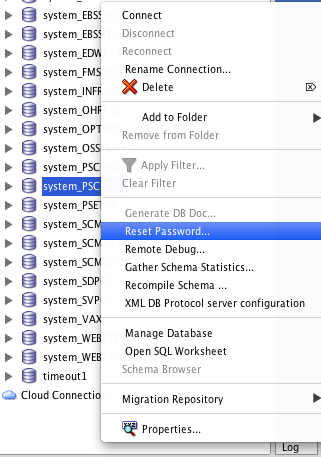
Resetting Your Oracle User Password with SQL Developer on OSX

This post started as a shameless copy of Jeff Smiths Resetting Your Oracle User Password with SQL Developer - but it ended in a trilogy about OSX, Oracle and SQLDeveloper.
In my first two posts I made myself comfortable with Oracle instant client on my MacBook. Now I want to use it for something more serious, like changing passwords.

Even with all the modifications from previous post SQLDeveloper still does not show the Reset Password... option. The reason: it just don't know about the library correctly.

First the PATH as shown in previous post is not set in an application started via launcher - It does not contain the ORACLE_HOME at all. But even as I forced that with a temporary hack it did not help; so I just can say: with OSX it's more complicated to let SQLDeveloper use the proper libraries.

As the PATH is not that important on OSX, the real issue is DYLD_LIBRARY_PATH. Regardless if it's set in /etc/profiles or ~/.profiles - they never reach an application started via launcher, probably for similar reasons like PATH shown above.

But there is hope: ORACLE_HOME as set in /etc/launchd.conf is shown in the environment of SQLDeveloper. At the end, that's all we need, now just to check where to put this little flame of hope to let it grow to a bonfire.

From now on I'm talking about SQLDeveloper 3.2.20.09! Future Versions might behave different!

The script to check is
/Applications/SQLDeveloper.app/Contents/Resources/sqldeveloper/ide/bin/launcher.sh. There is a function called CheckLibraryPath() which is supposed to check for a proper LD_LIBRARY_PATH (or it's equivalences) and if not set create a proper setting. Oracle just forgot to check about OSX! I write forgot on purpose, as HP-UX is checked with
if [ `uname -s` = 'HP-UX' ] and SHLIB_PATH is set instead of LD_LIBRARY_PATH.

So my solution is simple: I just enhance this function with this little patch:
524a525,541
>  elif [ `uname -s` = 'Darwin' ]
>  then
>   echo "OSX!"
>   if [ "X$DYLD_LIBRARY_PATH" = "X" ]
>  then
>   DYLD_LIBRARY_PATH=$ORACLE_HOME
>   #  only instant client exists on OSX
>  else
>   echo $DYLD_LIBRARY_PATH | egrep -e "(^|\:)$ORACLE_HOME($|\:)" > /dev/null
>   if [ $? != 0 ]
>   then
>    DYLD_LIBRARY_PATH=$DYLD_LIBRARY_PATH:$ORACLE_HOME
>   fi
> 
>  fi
>  export DYLD_LIBRARY_PATH
>  #echo "$DYLD_LIBRARY_PATH"


With this little patch now I can change the password of my users with SQLDeveloper on OSX!