Posts mit dem Label password werden angezeigt. Alle Posts anzeigen

2023-02-18

OEM 13.5 - change cman password

During the last week I learned how seldom Oracles Connection Manager (cman) is used. This also means it's integrated into the ecosystem with less motivation - at least in comparison to other products.  

One such a loose integration is the management of cman passwords in Oracle Enterprise Manager (OEM). 

In the web interface it's quite easy: The password is just a property like anything else. 

But it gets more complicated when trying to change the configuration with emcli. The "obvious" approach, use emcli set_credential fails: 


emcli set_credential \
-target_type="oracle_cman" \
-target_name="$cman" \
-credential_set="CmanCredsMonitoring" \
-monitoring

Internal Error: The EM CLI system has encountered an internal error. Details have been added to the OMS log files.

Well, there are other methods to modify properties - and it somehow seems OEM indicates cmans password more a property than a password. With this in mind, the password can be modified: 

emcli modify_target \
-type="oracle_cman" \
-name="$cman" \
-properties="Password:xxx"

Target "cman_········:oracle_cman" modified successfully

Unfortunately, this command can be used to set a password. but when trying to delete it (yes, this might happen sometimes) it fails:

emcli modify_target \
-type="oracle_cman" \
-name="$cman" \
-properties="Password:"

Syntax Error: Invalid value for parameter "properties": "Password:". Reason: "Password:" is not a name-value pair.


At the moment, I don't have a reasonable solution how to delete cmans password in OEM configuration. The only supported way is to do it in the web frontend - but this just doesn't scale and is not very cloud-ish (aka automated). 

I can do the totally unsupported method by updating the OEM repository table SYSMAN.EM_NC_CRED_COLUMNS  and set CREAD_ATTR_VALUE to NULL. My query to get it's content is 


select mt.target_name
     , mt.target_type
	 , mt.emd_url
	 , mt.target_guid
     , etc.set_name
     , encc.*
from sysman.MGMT$target mt
   , sysman.EM_TARGET_CREDS etc
   , sysman.em_nc_cred_columns encc
where 1=1
  and mt.target_guid = etc.target_guid
  and etc.cred_guid  = encc.cred_guid
  and mt.target_type = 'oracle_cman'
  and mt.target_name like '%&cman_name%'
order by 1 ;

you can guess the update statement.  OR, we hope Oracle will soon implement the Enhancement Request 35084478 : EMCLI delete password not working for cman target


2018-06-26

when it runs on your computer ...

... please don't see it ready for customers.

I try to enable Database Vault on an existing 12.2 database.
A proper document to follow is How To Enable Database Vault in a 12c database ? (Doc ID 2112167.1)

At some point it tells to run
@$ORACLE_HOME/rdbms/admin/catmac.sql system temp <system_password>

unfortunately this fails with
CREATE USER dvsys IDENTIFIED BY "D_DVSYSPW"
*
ERROR at line 1:
ORA-28003: password verification for the specified password failed
ORA-20025: Password must contain at least 1 digit(s)
(you need to spool the results into a file to find it in the output stream)

The reason is obvious:
SQL> select * from dba_profiles where resource_name='PASSWORD_VERIFY_FUNCTION' and Profile='DEFAULT';

PROFILE                        RESOURCE_NAME                    RESOURCE LIMIT                                    COM
------------------------------ -------------------------------- -------- ---------------------------------------- ---
DEFAULT                        PASSWORD_VERIFY_FUNCTION         PASSWORD ORA12C_VERIFY_FUNCTION                   NO

and so is the solution:
alter profile default limit PASSWORD_VERIFY_FUNCTION null;
@$ORACLE_HOME/rdbms/admin/catmac.sql system temp <system_password>
alter profile default limit PASSWORD_VERIFY_FUNCTION ORA12C_VERIFY_FUNCTION;


Oracle requires to disable a security feature to enable another one.
In this sandbox environment it's not a specific, hand-made password verify function. It's the default one from oracle.
It would be very nice if oracle would test it's security features to run with each other.

There is no problem for me, but I'm wondering how serious (holistic) Oracle takes "security"?

2016-02-08

access to CHM raw data - without manipulating the -MGMTDB

In Version 12.1 Oracle introduced the Grid Infrastructure Management Repository (GIMR) called ‑MGMTDB.
This self managed pluggable database is a required component of Grid Infrastructure and should never require direct interactions. (there can be some interactions when you want to migrate to different diskgroups, but also those activities are covered within wrapper scripts provided by Oracle).
Every interaction with the data stored in this DB is done through applications - oclumon might be the best know. (If you prefer a graphical interface, you can check chmosg instead). Just as these are interfaces for the data stored on CHM user, Oracle does not provide any information how to connect to the database directly and query the data.
Of course I can always do a bequeath connection to the CDB, do a
alter session set container = <cluster_name>;

and query the tables directly. But sometimes I prefer to do queries from my PC, using sqldeveloper. So I was searching for CHMs password.

The probably most complicated way is to identify where the password could be stored. After some internet research I was sure it would be worth to check for a wallet stored in OCR. Even the docu does not show it, crsctl query wallet can show some details about a wallet called MGMTDB.

crsctl query wallet -type MGMTDB -all
CRS-10252: Aliases present in the wallet 'MGMTDB' are:
CHM
PCMRADMIN

So I know there is a wallet and it contains 2 credentials, but crsctl does not provide their passwords - at least I did not find out how.

So I have to go the longer way:

First get the proper entry from OCR:
ocrdump -keyname SYSTEM.WALLET.MGMTDB -xml /tmp/ocrdump.SYSTEM.WALLET.MGMTDB.xml

Then some transformation to get from
<name>SYSTEM.WALLET.MGMTDB</name>
<value_type>BYTESTREAM (16)</value_type>
<value>&lt;![CDATA[a1f84e370000000600000021.............
</value>

to a wallet which can be used by mkstore:
echo "cat //OCRDUMP/KEY/VALUE/text()" | \
xmllint --nocdata --shell /tmp/ocrdump.SYSTEM.WALLET.MGMTDB.xml |  \
head -n -1 | tail -n -1 | \
xxd -r -p > /tmp/ocrdump.SYSTEM.WALLET.MGMTDB.bin

Not that complicated at all. Now it's mkstore to query the details:
mkstore -wrl /tmp/ocrdump.SYSTEM.WALLET.MGMTDB.bin -list
Oracle Secret Store Tool : Version 12.1.0.2
Copyright (c) 2004, 2014, Oracle and/or its affiliates. All rights reserved.

Oracle Secret Store entries:
CHM
PCMRADMIN


It's quite similar to the previous result from crsctl query wallet - so we are nearly there!


mkstore -wrl /tmp/ocrdump.SYSTEM.WALLET.MGMTDB.bin \
-viewEntry CHM
Oracle Secret Store Tool : Version 12.1.0.2
Copyright (c) 2004, 2014, Oracle and/or its affiliates. All rights reserved.
 CHM = cRlu7yvFd7gZoYmqEl2Ye6jx143Iji

mkstore -wrl /tmp/ocrdump.SYSTEM.WALLET.MGMTDB.bin \
-viewEntry PCMRADMIN
Oracle Secret Store Tool : Version 12.1.0.2
Copyright (c) 2004, 2014, Oracle and/or its affiliates. All rights reserved.

 PCMRADMIN = mfqO8gPGFfzQZWPgyZhwO0pZk8zgSu

Here I have the passwords I'm looking for!

To connect to the -MGMTDB I need the listener information:
lsnrctl status MGMTLSNR

LSNRCTL for Linux: Version 12.1.0.2.0 - Production on 08-FEB-2016 10:52:00

Copyright (c) 1991, 2014, Oracle.  All rights reserved.

Connecting to (DESCRIPTION=(ADDRESS=(PROTOCOL=IPC)(KEY=MGMTLSNR)))
STATUS of the LISTENER
------------------------
Alias                     MGMTLSNR
Version                   TNSLSNR for Linux: Version 12.1.0.2.0 - Production
Start Date                24-JAN-2016 11:21:26
Uptime                    14 days 23 hr. 30 min. 33 sec
Trace Level               off
Security                  ON: Local OS Authentication
SNMP                      OFF
Listener Parameter File   /some_path/grid/grid_12102/network/admin/listener.ora
Listener Log File         /some_path/logs/grid/diag/tnslsnr/av3l958t/mgmtlsnr/alert/log.xml
Listening Endpoints Summary...
  (DESCRIPTION=(ADDRESS=(PROTOCOL=ipc)(KEY=MGMTLSNR)))
  (DESCRIPTION=(ADDRESS=(PROTOCOL=tcp)(HOST=1.2.3.4)(PORT=1521)))
  (DESCRIPTION=(ADDRESS=(PROTOCOL=tcp)(HOST=5.6.7.8)(PORT=1521)))
Services Summary...
Service "-MGMTDBXDB" has 1 instance(s).
  Instance "-MGMTDB", status READY, has 1 handler(s) for this service...
Service "_mgmtdb" has 1 instance(s).
  Instance "-MGMTDB", status READY, has 1 handler(s) for this service...
Service "crs908" has 1 instance(s).
  Instance "-MGMTDB", status READY, has 1 handler(s) for this service...
The command completed successfully

With all those bits and pieces I am able to connect to CHM@-MGMTDB:

CHM/cRlu7yvFd7gZoYmqEl2Ye6jx143Iji@1.2.3.4:1521/crs908 

It's not very practical, especially as the pasword can change for several reasons without notification, but still for any deeper data analysis it's handy to access the tables directly.

2013-02-15

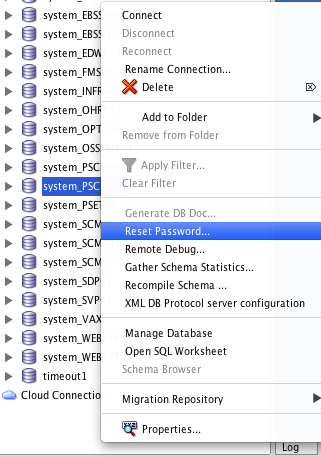
Resetting Your Oracle User Password with SQL Developer on OSX

This post started as a shameless copy of Jeff Smiths Resetting Your Oracle User Password with SQL Developer - but it ended in a trilogy about OSX, Oracle and SQLDeveloper.
In my first two posts I made myself comfortable with Oracle instant client on my MacBook. Now I want to use it for something more serious, like changing passwords.

Even with all the modifications from previous post SQLDeveloper still does not show the Reset Password... option. The reason: it just don't know about the library correctly.

First the PATH as shown in previous post is not set in an application started via launcher - It does not contain the ORACLE_HOME at all. But even as I forced that with a temporary hack it did not help; so I just can say: with OSX it's more complicated to let SQLDeveloper use the proper libraries.

As the PATH is not that important on OSX, the real issue is DYLD_LIBRARY_PATH. Regardless if it's set in /etc/profiles or ~/.profiles - they never reach an application started via launcher, probably for similar reasons like PATH shown above.

But there is hope: ORACLE_HOME as set in /etc/launchd.conf is shown in the environment of SQLDeveloper. At the end, that's all we need, now just to check where to put this little flame of hope to let it grow to a bonfire.

From now on I'm talking about SQLDeveloper 3.2.20.09! Future Versions might behave different!

The script to check is
/Applications/SQLDeveloper.app/Contents/Resources/sqldeveloper/ide/bin/launcher.sh. There is a function called CheckLibraryPath() which is supposed to check for a proper LD_LIBRARY_PATH (or it's equivalences) and if not set create a proper setting. Oracle just forgot to check about OSX! I write forgot on purpose, as HP-UX is checked with
if [ `uname -s` = 'HP-UX' ] and SHLIB_PATH is set instead of LD_LIBRARY_PATH.

So my solution is simple: I just enhance this function with this little patch:
524a525,541
>  elif [ `uname -s` = 'Darwin' ]
>  then
>   echo "OSX!"
>   if [ "X$DYLD_LIBRARY_PATH" = "X" ]
>  then
>   DYLD_LIBRARY_PATH=$ORACLE_HOME
>   #  only instant client exists on OSX
>  else
>   echo $DYLD_LIBRARY_PATH | egrep -e "(^|\:)$ORACLE_HOME($|\:)" > /dev/null
>   if [ $? != 0 ]
>   then
>    DYLD_LIBRARY_PATH=$DYLD_LIBRARY_PATH:$ORACLE_HOME
>   fi
> 
>  fi
>  export DYLD_LIBRARY_PATH
>  #echo "$DYLD_LIBRARY_PATH"


With this little patch now I can change the password of my users with SQLDeveloper on OSX!